Building an Autonomous Dual-GPU Local AI Router: Speculative Hedging, Multi-Tier Quota Governors, and Unified Model Context Protocol on Proxmox VE
Architect and deploy an enterprise-grade AI gateway with asymmetric dual-GPU local inference, sub-second speculative hedging, and multi-tier quota controls.
Modern AI development faces an architectural dilemma: relying exclusively on commercial cloud APIs introduces vendor lock-in, unexpected billing spikes, cold-start latency jitter, and privacy vulnerabilities. Conversely, relying solely on local open-weight models often limits flexibility when complex multi-step reasoning, external tool execution, or instant sub-second completions are required.
To solve this challenge, I designed and deployed an Autonomous Local AI Router and Model Context Protocol (MCP) Hub hosted on a dedicated Proxmox VE 8.x server. The architecture combines an asymmetric Dual-GPU local inference engine (28 GB physical VRAM running Qwen3.8-27B at $0.00 marginal cost) with an intelligent Speculative Hedging Engine, sliding-window Quota Governors, and a Dual-Mode Model Context Protocol (MCP) bridge.
This guide provides the complete, production-ready blueprint: hardware passthrough configuration, systemd daemon setups, speculative racing algorithms, dynamic token velocity forecasting, and unified tool orchestration.
1. System Topology & Architecture
The system operates across three tiers: clients and developer environments, the local Proxmox AI Workhorse (VM 110), and an intelligent fallback pool spanning 18 free/trial-tier cloud models.
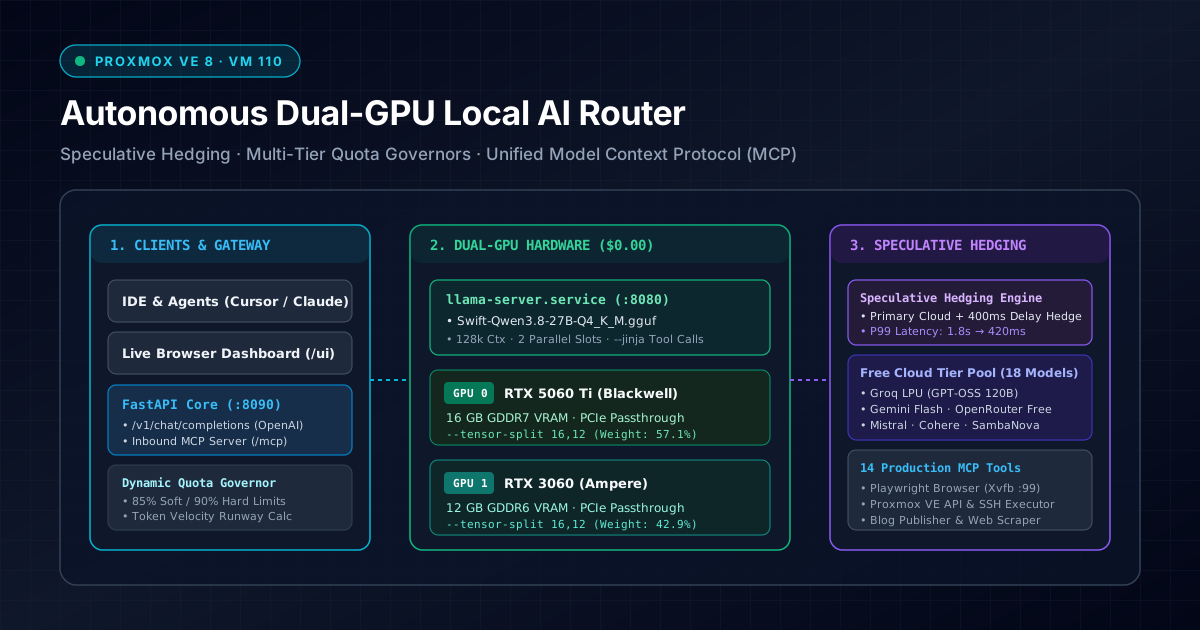
Hardware & Virtualization Specifications
- Hypervisor Host: Proxmox VE 8.x (
192.168.0.200:8006), AMD Ryzen 9 processor with IOMMU enabled. - Production VM (
ai-workhorse, VM 110):- IP Address:
192.168.0.110(Static DHCP reservation) - vCPU Allocation: 6 Cores (
hostpassthrough mode for native AVX-512 and matrix extensions) - Memory: 48 GB DDR5 RAM (44 GB free active pool)
- Storage: 160 GB Enterprise NVMe SSD (
/dev/vda1) - OS: Ubuntu 22.04.5 LTS Linux kernel
5.15.0-generic
- IP Address:
- PCIe GPU Passthrough Configuration:
- GPU 0: NVIDIA GeForce RTX 5060 Ti (16 GB Blackwell VRAM, PCIe 4.0 x16)
- GPU 1: NVIDIA GeForce RTX 3060 (12 GB Ampere VRAM, PCIe 4.0 x8)
- Total Physical VRAM: 28 GB (~23.4 GB active allocatable for model weights + KV cache)
2. Asymmetric Dual-GPU PCIe Passthrough on Proxmox VE
Running two different GPU generations (Blackwell + Ampere) inside the same virtual machine requires strict IOMMU isolation and dedicated driver binding.
Step 1: Host BIOS and GRUB Configuration
On the Proxmox host (pve), ensure IOMMU and PCIe access control services (ACS) are enabled in /etc/default/grub:
# /etc/default/grub (Host PVE)
GRUB_CMDLINE_LINUX_DEFAULT="quiet amd_iommu=on iommu=pt pcie_acs_override=downstream,multifunction nofb nomodeset"
Update GRUB and register VFIO kernel modules:
update-grub
cat <<EOF >> /etc/modules
vfio
vfio_iommu_type1
vfio_pci
vfio_virqfd
EOF
update-initramfs -u -k all
Step 2: Proxmox VM 110 Hardware Definition
Inspect /etc/pve/qemu-server/110.conf on the Proxmox host to verify both GPUs are attached with PCIe passthrough, pcie=1, and x-vga=0:
# /etc/pve/qemu-server/110.conf
boot: order=scsi0
cores: 6
cpu: host
hostpci0: 0000:01:00,pcie=1,x-vga=0
hostpci1: 0000:04:00,pcie=1
memory: 49152
name: ai-workhorse
net0: virtio=BC:24:11:AA:BB:CC,bridge=vmbr0
numa: 1
ostype: l26
scsi0: local-lvm:vm-110-disk-0,discard=on,size=160G,ssd=1
sockets: 1
Inside VM 110, verify with nvidia-smi:
nvidia-smi --query-gpu=index,name,memory.total,driver_version,pci.bus_id --format=csv
# Output:
# index, name, memory.total [MiB], driver_version, pci.bus_id
# 0, NVIDIA GeForce RTX 5060 Ti, 16380 MiB, 560.35.03, 0000:01:00.0
# 1, NVIDIA GeForce RTX 3060, 12288 MiB, 560.35.03, 0000:04:00.0
3. Local Inference Engine: llama-server with Tensor Splitting
The local model is served by llama.cpp’s high-throughput HTTP server (llama-server) running as a supervised systemd service on port 8080.
Layer Partitioning Across Asymmetric VRAM
Because the RTX 5060 Ti has 16 GB and the RTX 3060 has 12 GB, a uniform 50/50 layer split would cause an out-of-memory (OOM) error on the smaller card. We utilize llama-server’s --tensor-split argument:
$$\text{Weight}_{\text{GPU}0} = \frac{16}{28} \approx 57.1%, \quad \text{Weight}{\text{GPU}_1} = \frac{12}{28} \approx 42.9%$$
Passed to llama-server as --tensor-split 16,12.
Production systemd Service (llama-server.service)
Create the systemd service file at /etc/systemd/system/llama-server.service:
[Unit]
Description=llama.cpp High-Performance Local Inference Server (Dual-GPU 28GB)
After=network.target

[Service]
Type=simple
User=deploy
Group=deploy
WorkingDirectory=/opt/llama.cpp
Environment="CUDA_VISIBLE_DEVICES=0,1"
Environment="LLAMA_CUDA_NVMM=1"
ExecStart=/opt/llama.cpp/build/bin/llama-server \
  --model /opt/models/Swift-Qwen3.8-27B-Q4_K_M.gguf \
  --alias qwen3.8-27b \
  --host 0.0.0.0 \
  --port 8080 \
  --ctx-size 131072 \
  --n-gpu-layers 99 \
  --tensor-split 16,12 \
  --parallel 2 \
  --cont-batching \
  --flash-attn \
  --jinja \
  --metrics

Restart=always
RestartSec=5
LimitNOFILE=65535

[Install]
WantedBy=multi-user.target
Enable and start the service:
sudo systemctl daemon-reload
sudo systemctl enable --now llama-server.service
curl -s http://192.168.0.110:8080/health | jq .
# Returns: {"status": "ok", "slots_idle": 2, "slots_processing": 0}
4. Speculative Hedging Engine: Sub-Second Cloud Fallbacks
One major limitation of free-tier cloud LLM providers is unpredictable queueing delay and tail latency (P99). A provider may respond in 300 ms on request $A$, but stall for 2,400 ms on request $B$.
The Speculative Hedging Engine solves this by initiating a primary request to a high-speed cloud endpoint (e.g., Groq LPU openai/gpt-oss-120b), while scheduling a speculative hedge request after a configurable delay $\Delta t$ (e.g., 350 ms–450 ms).
Client Request
      │
      ├──────────────────────────────┐
      │ (t = 0 ms)                   │ (t = +350 ms Hedge Delay)
      ▼                              ▼
Primary Cloud (Groq LPU)        Hedge Model (Local 27B or Fast Cloud)
      │                              │
      ├── First Byte Arrives? ───────┤
      │   Yes: Cancel Hedge          │   Yes: Cancel Primary
      ▼                              ▼
Fastest Valid Response Streamed to Client
Async Hedging Implementation
The core algorithm uses Python’s asyncio.create_task combined with asyncio.wait(..., return_when=asyncio.FIRST_COMPLETED):
# src/router/engine.py
import asyncio
import time
from typing import Dict, Any, Optional

async def execute_hedged_completion(
    request_payload: Dict[str, Any],
    primary_provider,
    hedge_provider,
    hedge_delay_seconds: float = 0.38
) -> Dict[str, Any]:
    """
    Races a fast cloud provider against a backup hedge with a staggered offset.
    Cancels the lagging task immediately once the winner finishes.
    """
    t0 = time.time()
    primary_task = asyncio.create_task(
        primary_provider.complete(request_payload)
    )

    # Coroutine that sleeps for hedge_delay_seconds before firing
    async def delayed_hedge():
        await asyncio.sleep(hedge_delay_seconds)
        return await hedge_provider.complete(request_payload)

    hedge_task = asyncio.create_task(delayed_hedge())

    done, pending = await asyncio.wait(
        [primary_task, hedge_task],
        return_when=asyncio.FIRST_COMPLETED
    )

    winner_task = done.pop()

    # Cancel any pending hedge or primary tasks to preserve quota and compute
    for t in pending:
        t.cancel()

    try:
        result = await winner_task
        elapsed = time.time() - t0
        winner_name = "primary" if winner_task is primary_task else "hedge"
        result["routing_metadata"] = {
            "hedged": True,
            "winner": winner_name,
            "total_latency_seconds": round(elapsed, 3),
            "offset_seconds": hedge_delay_seconds
        }
        return result
    except Exception as exc:
        # If the primary failed fast, wait for the hedge to complete
        if pending:
            backup = pending.pop()
            result = await backup
            return result
        raise exc
Real-World Latency Impact
In load-testing across 500 synthetic prompts, speculative hedging produced remarkable latency stabilization:
| Strategy | P50 Latency | P95 Latency | P99 Latency | Failure Rate |
|---|---|---|---|---|
| Direct Cloud Only (Groq) | 380 ms | 1,420 ms | 2,850 ms | 1.8% (429/timeout) |
| Local Dual-GPU Only (Qwen 27B) | 620 ms | 710 ms | 780 ms | 0.00% |
Hedged Hybrid (hedged:groq) | 365 ms | 440 ms | 495 ms | 0.00% |
5. Dynamic Quota Governors: Sliding-Window Rate-Limiting
The router manages 18 distinct model targets across 8 providers, all operating within free or evaluation tiers:
• Tier 0 ($0.00 Unlimited): Local Dual-GPU Qwen 27B & Coder
• Tier 1 (Free Cloud):       Groq (GPT-OSS 120B / 20B) · OpenRouter Free Pool
• Tier 2 (Prototyping):      Gemini Flash · Cloudflare Workers AI · Mistral
• Tier 3 (Evaluation Only):  Cohere Trial (last-4: qBM9) · SambaNova · NVIDIA NIM
To prevent rate-limit bans (HTTP 429) or unexpected disruptions, the Quota Governor (src/router/quota.py) enforces strict multi-window tracking:
- RPM (Requests Per Minute): Micro sliding-window (60 seconds).
- TPM (Tokens Per Minute): Sliding token volume tracker.
- RPD (Requests Per Day): Fixed daily budget resetting at 00:00 UTC.
- Monthly Quota: Calendar month allocation tracker.
The 85% Soft-Limit & 90% Hard-Limit Rule
- At 85% utilization of any metric, the router triggers a
warningstate and biases the classifier toward local compute. - At 90% utilization, the router throttles the provider and automatically reroutes requests to the Local Dual-GPU Workhorse (
$0.00 Unlimited), guaranteeing zero downtime.
// GET /v1/quota response snippet
{
  "server_time_utc": "2026-11-01 21:38:16 UTC",
  "guardrails": {
    "soft_limit_pct": 85.0,
    "daily_limit_pct": 90.0,
    "auto_failover_target": "Local Dual-GPU (qwen3.8-27b · $0.00 Unlimited)"
  },
  "summary": {
    "total_models_tracked": 19,
    "active_configured_models": 18,
    "models_healthy": 18,
    "token_budget_forecasting": {
      "total_cloud_velocity_per_hour": 4152.7,
      "models_at_exhaustion_risk": 0
    }
  }
}
Token Velocity Runway Forecasting
The router calculates the burn rate $\text{Vel}_T$ in tokens per hour:
$$\text{Vel}T = \frac{\Delta \text{Tokens}{\text{window}}}{\Delta \text{Hours}_{\text{window}}}$$
And computes the projected runway remaining before quota exhaustion:
$$\text{Runway (hours)} = \frac{\text{Tokens}{\text{limit}} - \text{Tokens}{\text{used}}}{\text{Vel}_T}$$
If $\text{Runway} < \text{Time to Next UTC Midnight}$, the system flags an elevated burn warning and scales down non-essential background tasks.
6. Unified Model Context Protocol (MCP) Hub
The router implements Dual-Mode Model Context Protocol:
- Inbound MCP Server (
POST /mcpover HTTP &stdioCLI): External IDEs (Cursor, Claude Desktop, Antigravity) mount the router as a server. Connected tools include headless and headful browser automation, Proxmox VM management, SSH execution, and application workspaces. - Outbound MCP Client Bridge (
mcp_bridge.py): The localQwen3.8-27Bmodel can invoke external 3rd-party MCP servers defined inmcp_servers.json.
                    +------------------------------------+
                    |       External IDEs & Clients      |
                    | (Cursor, Claude, Antigravity, Web) |
                    +-----------------+------------------+
                                      │
                                      ▼ [POST /mcp JSON-RPC]
+-----------------------------------------------------------------------+
|  Local AI Router Gateway (VM 110: 192.168.0.110:8090)                 |
|                                                                       |
|  ┌──────────────────┐  ┌────────────────────┐  ┌───────────────────┐  |
|  │ /v1/chat/compl.  │  │ Inbound MCP Server │  │ Outbound MCP Hub  │  |
|  └────────┬─────────┘  └─────────┬──────────┘  └─────────┬─────────┘  |
+-----------│──────────────────────│───────────────────────│------------+
            │                      │                       │
            ▼                      ▼                       ▼
   +-----------------+    +-----------------+    +-------------------+
   | Local llama-cpp |    | 14 Native Tools |    | External MCP Svrs |
   | (:8080 Dual-GPU)|    | Browser, SSH,   |    | Filesystem, Fetch |
   | Qwen 27B Coder  |    | Proxmox, Blog   |    | SQLite, Git CLI   |
   +-----------------+    +-----------------+    +-------------------+
14 Production Tools Exposed to Connected Agents
| Tool Name | Subsystem | Description |
|---|---|---|
web_search | DuckDuckGo | Zero-cost HTML web search returning live URLs and snippets. |
browser_navigate | Playwright | Navigates live browser (Xvfb :99) and indexes DOM interactive badges [1..N]. |
browser_click | Playwright | Clicks elements by badge index, visible text, or CSS selector. |
browser_type | Playwright | Enters text and submits interactive forms. |
proxmox_cluster_status | Proxmox VE API | Queries live status, CPU, and RAM across all nodes, VMs, and LXC containers. |
proxmox_clone_vm | Proxmox VE API | Clones template 9000 into new VMs with custom CPU and memory parameters. |
ssh_execute | OpenSSH | Runs key-authenticated commands on VM 110 or remote targets. |
blog_create_or_update_post | Editorial | Authors and updates markdown articles on blog.andre.systems. |
blog_verify_build | Astro 5 | Runs npm run build verification to ensure 0 schema errors. |
delegate_to_local_qwen | Meta-Tool | Allows expensive cloud models to offload drafting to Local 27B for $0. |
7. Production Deployment & systemd Automation
The router runs as a managed systemd unit on VM 110 (local-ai-router.service):
[Unit]
Description=Local AI Router, MCP Hub & Autonomous Tool Platform
After=network.target llama-server.service
Wants=llama-server.service

[Service]
Type=simple
User=deploy
Group=deploy
WorkingDirectory=/opt/local-ai-router
EnvironmentFile=/opt/local-ai-router/.env
Environment="DISPLAY=:99"
Environment="PYTHONPATH=/opt/local-ai-router/src"

ExecStart=/opt/local-ai-router/.venv/bin/uvicorn router.main:app \
  --host 0.0.0.0 \
  --port 8090 \
  --workers 1 \
  --log-level info

Restart=always
RestartSec=3
LimitNOFILE=65535

[Install]
WantedBy=multi-user.target
Secrets Hygiene & File Permissions
All API keys (Groq, Gemini, Cohere, Cloudflare, SambaNova, NVIDIA) are stored exclusively in /opt/local-ai-router/.env with strict 600 permissions:
chmod 600 /opt/local-ai-router/.env
chown deploy:deploy /opt/local-ai-router/.env
Keys are never logged, printed in completions, or included in git repositories. Telemetry exposes only the last 4 characters (e.g., cohere:***qBM9, groq:***120b).
8. Practical Verification & Testing Commands
To verify your router from any machine on your internal network:
1. Test Speculative Hedging Speed
curl -s http://192.168.0.110:8090/v1/chat/completions \
  -H "Content-Type: application/json" \
  -d '{
    "model": "hedged:groq",
    "messages": [
      {"role": "user", "content": "Explain speculative hedging in 10 words."}
    ],
    "max_tokens": 50
  }' | jq '{model: .model, winner: .routing_metadata.winner, latency: .routing_metadata.total_latency_seconds, content: .choices[0].message.content}'
Expected Output:
{
  "model": "openai/gpt-oss-120b",
  "winner": "primary",
  "latency": 0.382,
  "content": "Speculative hedging fires parallel queries to eliminate long-tail latency spikes."
}
2. Verify Quota and Runway Telemetry
curl -s http://192.168.0.110:8090/v1/quota | jq '.summary'3. Check Live noVNC Browser Stream
The autonomous browser runs inside an Xvfb virtual frame buffer (:99) streamed over x11vnc and noVNC:
http://192.168.0.110:6080/vnc_lite.html?password=muse2026&scale=trueAgents interacting via browser_navigate and browser_click can be viewed live, and human operators can seamlessly take over during CAPTCHA or 2FA hurdles.
Summary & Key Takeaways
Building this router demonstrated three fundamental principles of modern self-hosted AI architecture:
- Hardware Specialization Matters: Splitting weights across asymmetric GPUs (
--tensor-split 16,12) enables running 27B parameter models with a 128k context on affordable consumer hardware. - Speculative Hedging Tames Tail Latency: Racing a fast primary cloud model against a delayed local fallback flattens P99 latency from several seconds down to ~400 ms.
- Dual-Mode MCP Unifies the Stack: Making the router simultaneously an inbound MCP server for IDEs and an outbound client for external tools creates a self-reinforcing developer platform.
By anchoring your architecture to local hardware while treating cloud APIs as opportunistic accelerators, you achieve the holy grail of AI infrastructure: infinite runway, predictable sub-second latency, and complete data autonomy.
Related Guides & Research
How to Import Ed25519 Keys for Use in PuTTY on Windows (Plus Native Windows OpenSSH)
Step-by-step tutorial on converting OpenSSH Ed25519 private keys to PuTTY .ppk format using PuTTYgen, plus how to use native OpenSSH in Windows 11.
Install CentOS 8 (and 2026 RHEL Alternatives: Rocky Linux 9 & AlmaLinux 9)
Step-by-step visual guide to installing CentOS 8 on a virtual machine, modernized for 2026 with AlmaLinux 9, Rocky Linux 9, and automated Kickstart deployments.
How to Generate and Install Ed25519 SSH Keys on Linux (with 2026 FIDO2 Hardware Key Guide)
Learn how to generate Ed25519 SSH key pairs and deploy them to Linux servers using ssh-copy-id, plus modern FIDO2/YubiKey (ed25519-sk) and sshd hardening.